
Harcum College Way Finding Case Study
A wayfinding system designed to improve navigation across campus spaces, parking lots, and building interiors through clearer signage, mapping, and directional structure. The project is currently being implemented across all campus buildings and parking lots as part of an ongoing effort to create a more intuitive and accessible navigation experience.
Role
Research, Information Architecture, Wayfinding Design, Prototyping
The Problem
Prospective students and visitors struggle to navigate campus due to outdated signage, unclear parking guidance, and information overload, making it difficult to locate parking areas, building entrances, and key destinations once on site.
The Approach
I conducted observational research on campus, noting common navigation behaviors and questions asked of staff. I then identified breakdowns in signage clarity and information structure to apply information architecture and wayfinding principles.
The Solution
A redesigned wayfinding system that improves navigation across campus spaces, parking lots, and building interiors through clearer signage, simplified directional mapping, and a more structured information hierarchy for easier orientation.
Campus Map Redesign
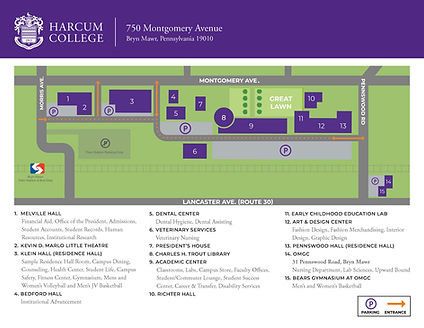
Improved the campus map to better support on-site navigation, addressing a key gap where visitors could arrive on campus but struggle to determine where to go next. Introduced color-coded zones, clear entrance and exit indicators, and dotted directional paths to visually guide movement and make orientation within the campus more intuitive and easy to follow. These updated maps are also being implemented throughout campus parking lots as physical signage to help guide visitors from the moment they arrive on campus.

Hallway Navigation Redesign
Improved hallway navigation by addressing information overload caused by excessive signage, which often led students to second-guess directions and repeatedly double-check their routes. Simplified floor-level signage to display only the relevant room numbers for each floor, organized numerically rather than alphabetically, creating a clearer and more intuitive navigation flow. Updated the background to purple to stand out against the existing white walls and used the secondary color yellow as a directional cue identifier to help guide users through the space more effectively.


Original Navigation Experience

Simplified Floor-Level Navigation
Want to keep exploring? View my ongoing mobile app redesign project with my cohort, where I focus primarily on UI design as part of a AmeriHealth Caritas collaboration still in progress.